Show Buddy Active/Setlist licenses can be purchased in our online shop.
Is Show Buddy Active/Setlist a subscription service?
Absolutely not! Your initial purchase cost gives you a perpetual license to use Show Buddy Active/Setlist, with no ongoing subscription costs or upgrade fees.
Can I run my license on more than one computer?
Your Show Buddy Active/Setlist license is personal to you. You can install your license on multiple computers, if you are the main user, and only one computer will be in use at any time.
For example, say you run lighting for your band, and need to install your Show Buddy Active/Setlist license onto a home computer for programming, a laptop for running live gigs, and a backup laptop for emergency use. This is fine, as you are the main user of all 3 computers.
However, you could not then install your license on a computer at your church for other people to use. This would require a second license for the church.
Do I need an internet connection to use Show Buddy Active/Setlist?
You need an internet connection to initially unlock your license. Thereafter, no internet connection is needed and Show Buddy Active/Setlist is yours to run forever.
Show Buddy Active/Setlist never “phones home” to check your license details. Your license will never time out, or be disabled by any other means. If you are at a gig with no Internet access, your software will always run fine.
DMXIS hardware is no longer being manufactured, and the DMXIS software is out of support. We now recommend Show Buddy Active for DMX lighting control.
If you currently use DMXIS, you can switch to using Show Buddy Active and import your existing DMXIS banks & presets. Your blue DMXIS box will work with Show Buddy Active, although support has been discontinued for the footswitch socket.
Please note that a Show Buddy Active license is a separate purchase.
Need an unlock code for DMXIS?
Until recently, it was still possible to request an unlock code for DMXIS via www.enttec.com/dmxis_unlock. That service is no longer available via the ENTTEC website.
The good news is, you can still unlock the software with your existing DMXIS unlock code. The same unlock code works on any computer.
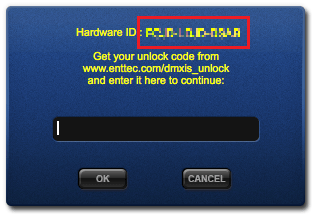
If you would like a reminder of your unlock code, please send your Hardware ID to support@db-audioware.com. This is displayed by the software when you connect your box:
Show Buddy Setlist is the new name for Show Buddy. If you already own a Show Buddy license, you can upgrade to Show Buddy Setlist for free. Your existing programming will remain intact. Grab the latest software here.
Do I need Show Buddy Active or Show Buddy Setlist?
Show Buddy Active is a DMX lighting controller. You use it to program lighting “looks”, and switch between those looks manually at showtime (using a footswitch, MIDI controller, or computer mouse/keyboard). It comes with VST and AudioUnit plugin support, allowing you to automate your light show from a DAW.
Show Buddy Active can also play back video clips to a projector (with the optional ‘Projection’ license).
Show Buddy Setlist automates your shows. Think of it like a easy-to-use DAW, which can play your audio backing tracks, organise your songs into sets, display lyrics, and control your lighting & MIDI equipment for a fully synchronised hands-free show.
If you just want manual control of your lighting rig, or you want to add an automated light show controlled by your DAW, choose Show Buddy Active.
If you don’t use a DAW, but want a simple way to to pre-program your full show (leaving you free to perform while the software takes care of your audio & lighting) then choose both Show Buddy Setlist + Show Buddy Active.
We’ve retired the old DMXIS discussion forum. They were no longer sufficiently active to be useful and contained a great deal of outdated and inaccurate information.
We are now focusing support where it’s most effective. You can email support@db-audioware.com with any questions, and there’s an evolving knowledge base covering common issues.
This approach lets us respond directly and keep guidance current, so you’ll get accurate, up-to-date advice. Thanks for your understanding.
If you find that your lighting fixtures are not responding reliably to commands from your DMX controller (be it Show Buddy Active, DMXIS, or any other lighting controller) there are a number of things you can check.
The first thing to realise is this – DMX hardware problems are horribly difficult to diagnose. DMX communication is a very simplistic thing, with absolutely no error correction. When things go bad, they go bad in a confusing manner:
A poor quality cable connecting two fixtures might cause intermittent faults with a completely different fixture.
Changing the order of your fixtures could move the problem around randomly. An intermittent connection in a connector might only show up a problem once in a 3 hour show, as the room heats up.
Cheaply made fixtures might throw out interfere which causes other fixtures to misbehave – yet those fixtures will behave perfectly when connected alone.
Murphy’s Law dictates that these problems will hit you 5 minutes before showtime. So with this in mind, there are a few important guidelines which I recommend you observe.
Don’t use cheap mic cables to connect your lights. Please.
You will read many articles and forum posts from people who swear that they have “never had a problem using mic cables” and that “overpriced DMX cables are just a rip-off”. But the fact is that mic cable and DMX cable is quite different, and the difference becomes more significant as your cable runs increase in length.
DMX is a digital signal, and a long run of cheap mic cable will smudge out the nice sharp digital edges – to the point where fixtures have difficulty in distinguishing the offs from the ons. DMX cable is designed to carry a digital signal and does not do this (primarily, for the tech geeks out there, due to the lower capacitance of DMX cable).
Also, beware of using really cheap cables sourced from unknown retailers over the Internet. Or if you do, inspect the workmanship INSIDE the connectors yourself before taking them out on a gig. See the picture below, this is the inside of a free DMX cable supplied to me with a brand name fixture from a reputable retailer. Sometimes, cheap cables are cheap for a reason.
My personal opinion is that if you’ve spent hundreds or thousands on your lighting rig, it makes no sense to risk the inevitable problems that cheap cabling could bring you.
Take care of your cables and test them regularly.
Learn how to coil your cables properly (Google for videos on “cable over under”) and don’t tie them in a big knot when you load out at the end of a gig.
Inspect your cables regularly to check for wear & tear, especially at the connectors.
An XLR cable tester box is an invaluable investment for anyone wiring up PAs or lighting rigs on a regular basis. With an XLR tester, you can quickly check a cable for breaks, shorts and – very usefully – intermittent faults.
Have you properly terminated your DMX line?
The final fixture in your DMX chain must be fitted with a DMX terminator. This is simply an XLR connector containing a single resistor, and it prevents reflections of the DMX signal from travelling back up the DMX line, causing errors. It is particularly important to fit a terminator of your DMX cable run is long (over a hundred feet or so).
Again, you can read plenty of people who say that their rig has always worked perfectly without a terminator. But they’re probably just lucky, and one day – eventually – the DMX monster will bite them in the backside.
Clashing fixtures
So, you’ve checked your cabling and terminated properly, but your fixtures are still misbehaving. You might now have a more complex issue with your rig.
Not all fixtures are made equal. Many cheaper fixtures are developed to incredibly tight budgets, and some manufacturers won’t a spend a lot of time or money in testing, making sure that their fixture [a] conforms to the DMX specification and [b] works well in a variety of rigs with other fixtures.
Consequently, it’s quite common to find that when you add a new fixture to your rig, it causes interference and problems with the others. Again, these problems are incredibly hard to diagnose, because often the fixture causing the problem is not the one that exhibits the fault.
In cases like this, a DMX splitter is your friend. A splitter box takes one DMX input (from your controller) and splits it into a number of electrically independent DMX outputs. You then hook up the problem fixtures to one output, and the rest of your rig to another. Problem solved. Splitters also make it easier to route your DMX cabling around the stage. Two things to remember:
Each chain of fixtures connected to a splitter outout need its own terminator plug (as discussed above)
Don’t attempt to use a simple audio Y-cable to split a DMX chain into two branches, THIS WILL NOT WORK.
Controller issues
If you’ve ran through all the above checks, and you still have reliability problems with some fixtures, it’s time to investigate if your controller is causing the problem. First, take ONE fixture that is misbehaving, connect it directly to your controller with a short DMX cable and terminate it.
Now, if this single fixture still misbehaves, it’s possible that the controller is transmitting DMX data too quickly. Some fixtures – especially cheaper one – are not engineered to cope with the full 40Hz update rates that the DMX protocol supports. In this case, you can try lowering the transmit rate of your control to say 20-25Hz.
Summary
This is just a list of the most common & easy to resolve causes of fixture problems on a DMX lighting rig. While not an exhaustive list of everything that can go wrong, these are certainly the first things you should check out before deciding whether a fixture is actually defective.
You have programmed some fast changes into your DMX light show, for example to follow the beat of a song. But your lights seem to react sluggishly, and sometimes the lights seem to skip a beat.
The bottom line
The DMX protocol is not designed to handle very fast lighting changes, and you cannot make your lighting rig strobe accurately at high speeds (e.g. 16th notes @ 120bpm).
The detailed explanation
The DMX protocol allows for updating your lights at a maximum of 40Hz – that’s one update every 25ms. However, because many lights struggle to cope with the 40Hz rate, some controllers (including DMXIS) deliberately throttle the update rate to 25Hz, or one update every 40ms. This means you will run into timing anomalies quite easily if you try to program fast strobes.
A little math is required to explain further. Say you want your lights to flash on every beat of a 120bpm song. Each beat lasts 60/120 = 500ms, so to flash the lights on/off requires a DMX event sent every 250ms. This is much higher than the 40ms update rate, so all looks good…
Now, say you want to flash on every 1/2 beat. This needs a DMX event every 250/2 = 125ms. This is higher than the 40ms update rate, so every update will be received by your lights. But, you will start to notice some timing inaccuracies in the strobe effect…
Now, let’s go to 1/8 beat strobing. This needs a DMX event every 62.5/2 = 31.25ms. So now we’re in trouble – not only will the lights be unable to accurately track your desired pattern, but you will actually drop some events because the DMX hardware simply cannot keep up with the changes…
Unfortunately, the DMX protocol simply doesn’t handle fast changes well. If you want to strobe quickly, use the “strobe” macro feature that is built into most DMX lights. While they may not strobe perfectly in sync, they will at least strobe at a consistent rate.